Wordbrush Review: Turn Your Writing Into Custom AI Visuals
Creating a good image for an article, social media post, story, or creative project can take almost as much time as writing the content itself. Stock photos are convenient, but they often feel generic. Traditional image generators offer more creative freedom, yet they usually require carefully written prompts and several rounds of experimentation.
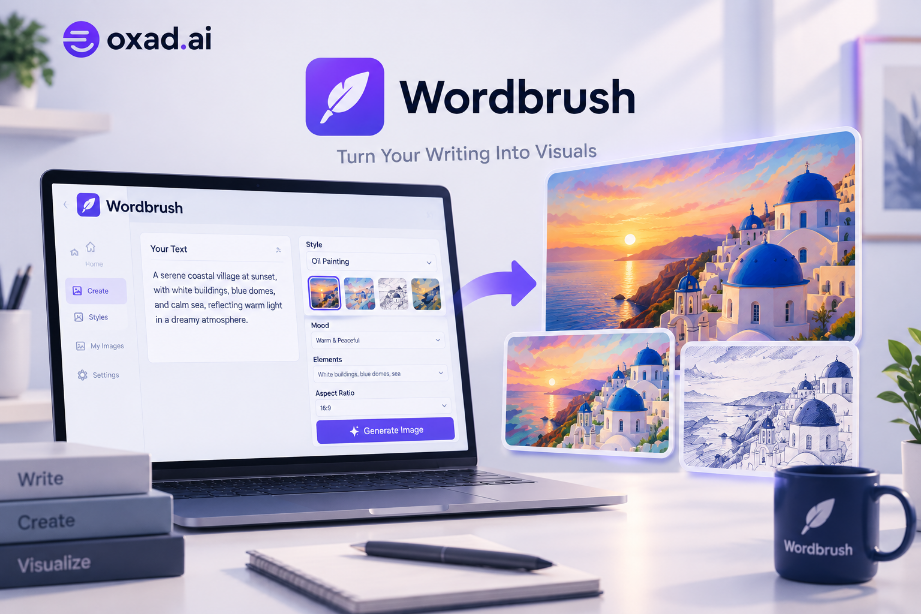
Wordbrush takes a different approach. Instead of asking users to build complicated image prompts from scratch, the platform is designed to transform existing writing into visual artwork. You provide the text, choose an artistic direction, add a few details, and let the system turn the written idea into an image.
This makes Wordbrush particularly interesting for bloggers, writers, marketers, social media creators, authors, and anyone who already has written content but needs a visual representation of it.
Quick verdict: Wordbrush is most interesting for people who want to create visuals from content they have already written. Its biggest advantage is the simplified text-to-visual workflow, combined with a large selection of artistic styles.
What Is Wordbrush?
Wordbrush is an AI-powered visual creation tool designed to generate custom illustrations directly from writing. Rather than starting with a blank prompt box, the platform focuses on the relationship between written content and visual storytelling.
You can provide writing from a blog post, story, poem, book, podcast description, or other creative content. Wordbrush then uses that material as the foundation for generating a visual concept.
The idea is simple: instead of searching through hundreds of stock images and trying to find something that approximately matches your article, you can create an image specifically inspired by the content itself.
This approach can be especially useful when your topic is highly specific. A stock photo library may have plenty of generic business, technology, or lifestyle images, but finding a picture that represents the exact idea of your article can be much harder.
How Wordbrush Works
The workflow is intentionally simple and can be completed in a few steps.
Start With Your Writing
The first step is to paste your existing text into the editor or write directly inside Wordbrush. The writing becomes the conceptual foundation for the visual.
This is one of the most interesting aspects of the platform because it changes the way users approach AI image generation. Instead of thinking about how to describe an image to an AI model, you can start with something you have already written.
Choose an Artistic Style
Wordbrush offers more than 50 art styles, covering a broad range of visual directions. The available styles include approaches inspired by traditional art, digital illustration, photography, modern design, and experimental aesthetics.
Examples include Cyberpunk, Pop Art, Minimalism, Gouache, Expressionism, Romanticism, Watercolor, Vector Art, Japanese Ukiyo-e, Photorealism, Digital Painting, Art Nouveau, Steampunk, Surrealism, and many others.
The large style selection means that the same piece of writing can potentially be visualized in very different ways depending on the audience and purpose of the project.
Add Details to Guide the Result
After selecting a style, Wordbrush allows you to add additional details. You can specify the mood you want the image to communicate and describe elements that should appear in the visual.
You can also identify things that should be excluded. This gives users additional control without forcing them to write a long technical prompt.
The platform also allows users to select an aspect ratio and adjust the level of detail, which can be useful when preparing visuals for different publishing formats.
Why Wordbrush Is Different From Traditional AI Image Generators
Most AI image generators begin with the same basic concept: describe what you want and let the model interpret your prompt.
That approach is powerful, but it can also create a learning curve. Users need to understand how to describe composition, lighting, style, subjects, camera angles, atmosphere, and other visual characteristics.
Wordbrush approaches the problem from the opposite direction.
Instead of asking, “How do I write the perfect image prompt?”, the user can ask, “How can I turn this piece of writing into a visual?”
That distinction makes Wordbrush particularly relevant to content creators. Someone who has already spent time writing an article does not necessarily want to spend another 20 minutes engineering an image prompt.
Approach
Typical Workflow
Best For
Wordbrush
Writing → Style → Details → Visual
Bloggers, writers and content creators
Traditional text-to-image
Prompt → Parameters → Generation → Refinement
Users who want detailed prompt control
Stock photography
Search → Filter → Select → Download
Generic and ready-made visuals
Wordbrush for Bloggers
Bloggers are one of the clearest audiences for Wordbrush.
A well-designed featured image can help an article look more professional when it appears on a website, social network, newsletter, or content discovery platform. The challenge is creating an image that actually reflects the subject of the article.
With Wordbrush, a blogger can start with the article itself and use that content as the basis for the visual.
For example, an article about the future of artificial intelligence could be transformed into a futuristic digital artwork. A travel story could be visualized with a photographic style. A historical article could use an artistic style inspired by the period being discussed.
This makes the tool more interesting than simply generating another generic “AI technology” image.
For publishers producing large amounts of content, this workflow can also reduce the amount of time spent searching for suitable stock photography.
Wordbrush for Social Media Content
Social media creators often need a steady supply of visual content. The problem is that repeatedly creating new designs can become time-consuming.
Wordbrush can be useful when the creator already has the text for a post, article, announcement, or story and wants to transform the idea into a visual.
The ability to select different styles also makes it possible to experiment with the same concept. A post can have a minimalist interpretation, a cyberpunk interpretation, a watercolor interpretation, or a more photographic look.
This can help creators move away from repetitive stock photography and develop more distinctive visual content.
Wordbrush for Authors and Storytellers
Wordbrush is not limited to short marketing content.
The platform showcases the idea of using writing from books and poetry as a source for visual creation. This makes it particularly interesting for authors, storytellers, and other creative professionals who want to visualize scenes or concepts from their writing.
For example, a writer could take a descriptive passage from a story and use it as the starting point for an illustration. A poet could transform the atmosphere of a poem into artwork. A podcast creator could visualize the central theme of an episode.
The important point is that the visual begins with the creator’s own words.
More Than 50 Art Styles
The style library is one of Wordbrush’s strongest features.
Instead of locking users into one visual aesthetic, the platform provides a large selection of styles. Some are artistic, some are photographic, and others are strongly influenced by digital or contemporary design.
Among the available directions are Cyberpunk, Minimalism, Pop Art, Expressionism, Gouache, Digital Painting, Concept Art, Isometric Art, Dystopian Art, Surrealism, Watercolor, Vector Art, Photorealism, Japanese Ukiyo-e, Bauhaus, Art Nouveau, Futurism, Pixel Art, and several other styles.
This variety matters because the best visual style depends heavily on the content. A professional business article may need a completely different aesthetic from a fantasy story or a technology blog.
Can Wordbrush Replace Stock Images?
For some types of content, it can be a useful alternative.
Stock photography remains valuable when you need authentic photographs of real people, locations, products, or specific situations. AI-generated artwork does not automatically replace that type of visual content.
However, stock libraries become less attractive when the objective is to create an original illustration that specifically reflects an article or story.
This is where Wordbrush has a clear conceptual advantage: the image is generated from the writing rather than selected from a pre-existing library.
For publishers who want their articles to have a more distinctive visual identity, this can be a compelling reason to try the platform.
Wordbrush vs Other AI Creative Tools
Wordbrush should not necessarily be viewed as a replacement for every AI image or creative platform. Different tools are optimized for different workflows.
For example, creators looking for a broader AI workspace may prefer a platform such as Runable, which combines multiple AI capabilities including image and video generation with other creative and productivity workflows.
On the other hand, users focused primarily on written content can explore dedicated AI writing tools when the main challenge is producing, rewriting, or optimizing the text itself.
The distinction is important. Wordbrush is particularly interesting when the text already exists and the next challenge is turning that content into a visual.
A practical content workflow
Create or refine the article with an AI writing platform, turn the finished concept into an image with Wordbrush, and use a broader creative workspace such as Runable when you need additional visual or media assets.
What Kind of Content Works Best With Wordbrush?
The strongest use cases are generally pieces of content where the written idea has a clear visual concept.
Blog articles and editorial content
Social media posts
Poetry and literary writing
Stories and fictional scenes
Podcast descriptions
Creative projects
Marketing content
Educational material
Technology articles
Visual storytelling projects
The more clearly the text communicates a subject, atmosphere, scene, or concept, the easier it is to understand why a writing-to-visual workflow can be useful.
What Could Make Wordbrush More Powerful?
Wordbrush is already focused on simplifying visual creation, but there is room for the platform to become even more useful as it develops.
One particularly interesting direction is custom style creation. Wordbrush currently presents custom styles based on example images as a coming-soon capability. If implemented effectively, this could be valuable for brands and publishers that want a consistent visual identity across multiple pieces of content.
Brand consistency is especially important for businesses producing large content libraries. Instead of generating every image with a completely different aesthetic, a custom style could potentially help maintain a recognizable visual language.
More advanced editing capabilities could also make the workflow more complete, particularly for users who want to refine an image after generation rather than moving it into another application.
Pros and Cons of Wordbrush
Pros
Turns existing writing into visual concepts
Simple workflow for beginners
No complicated image prompts required
More than 50 artistic styles
Style recommendations can simplify selection
Mood and image details can be specified
Users can define elements to include or exclude
Useful for blog and social media content
Suitable for writers and storytellers
Can provide an alternative to generic stock images
Things to Consider
It is a specialized visual creation workflow
Users wanting extensive prompt control may prefer other generators
Advanced post-generation editing may require another tool
Custom style creation is still presented as coming soon
Commercial usage terms should be checked before professional publication
Results can vary depending on the source writing and selected style
Is Wordbrush Worth Trying?
Wordbrush makes the most sense for a specific type of user: someone who already creates written content and wants a faster way to turn that content into original visuals.
If your workflow starts with articles, stories, poems, social posts, or other written material, the platform’s approach can save you from having to translate your ideas into complicated image prompts.
Its large selection of artistic styles is another strong point. Instead of generating everything with the same generic aesthetic, you can choose a style that fits the subject and tone of the content.
It is less compelling if you need highly advanced image manipulation, detailed character consistency, professional photo editing, or complete control over every aspect of an image. In those situations, a more advanced image-generation or editing workflow may be more appropriate.
But for writers, bloggers, marketers, authors, and social media creators who want to transform their words into visuals, Wordbrush is an interesting tool to add to the creative workflow.
Final Verdict
Wordbrush takes a refreshing approach to AI image generation by starting with something creators already have: their words.
Rather than making users become experts at prompt engineering, it focuses on a straightforward process of providing text, choosing a visual style, adding a few creative details, and generating an illustration.
The combination of text-based visual creation and more than 50 artistic styles makes the platform particularly relevant to content creators who need original visuals for articles, stories, social media, and other written projects.
If you regularly publish written content and find yourself searching for suitable stock images, Wordbrush is worth exploring. It may not replace every professional image-generation or editing workflow, but its writing-first approach gives it a distinct position among AI creative tools.
Explore Wordbrush
Discover the tool, its features, pricing information, use cases, and related AI tools on OXAD.AI.