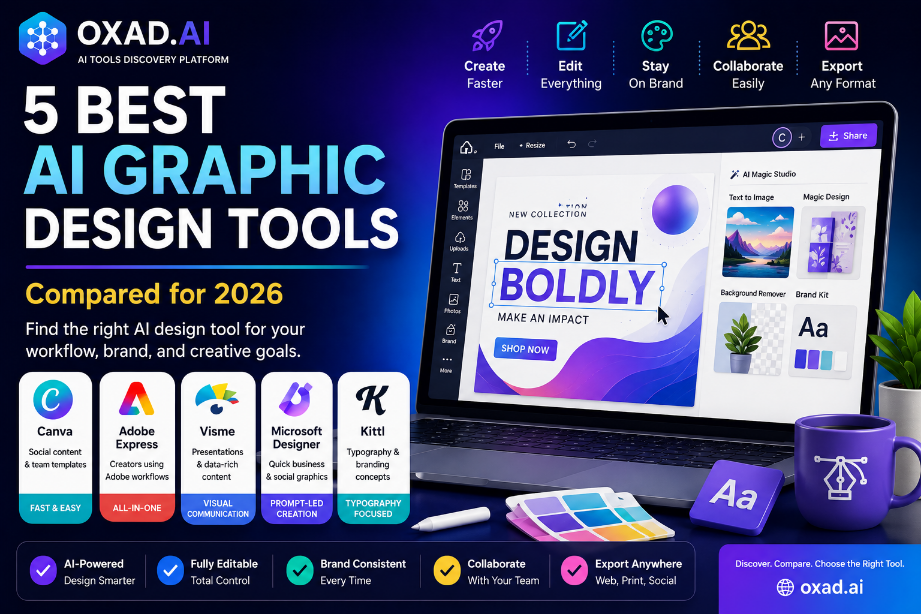
5 AI Graphic Design Tools and How to Choose the Right One
AI Design Tools Guide
5 Best AI Graphic Design Tools and How to Choose the Right One
The best AI graphic design tool is the one that fits your workflow—not necessarily the platform that produces the most impressive first image.
A useful design platform should help you move from an initial idea to an editable, reusable, and brand-consistent result. It should also give you enough control to correct AI-generated content, collaborate with others, export the right formats, and understand how included assets may be used.
Best for
Creators, marketers, small businesses, educators, and design teams
Main focus
Editable output, brand consistency, workflow speed, and collaboration
Essential safeguard
Review every generated design before commercial publication
Methodology
Oxad.ai evaluated the tools in this guide according to editing workflow, usability, brand controls, collaboration, output flexibility, suitability for common design tasks, and the amount of control available after AI generation. This is a vendor-neutral comparison and does not rank tools according to sponsorship or popularity alone.
Key Takeaways
Canva is a strong option for fast social content, templates, and repeatable team workflows.
Adobe Express suits creators who want accessible AI features connected to a broader Adobe workflow.
Visme is especially relevant for presentations, reports, infographics, and data-rich business content.
Microsoft Designer is useful for quick, prompt-led business and social graphics.
Kittl stands out for typography, merchandise concepts, vectors, mockups, and branding exploration.
The best platform should provide editable output and reduce the time required to reach an approved design.
How We Evaluated the AI Graphic Design Tools
A useful comparison should examine more than image-generation quality. AI may create an attractive first draft, but the real value of a design platform appears during editing, approval, reuse, and export.
Our evaluation focuses on:
Workflow speed: how quickly users can reach an acceptable first draft.
Brand control: support for logos, brand colors, fonts, templates, and reusable styles.
Collaboration: sharing, comments, permissions, approvals, and team access.
Output flexibility: support for social graphics, documents, presentations, video, print, and other formats.
Accessibility: ease of use for both designers and non-designers.
Licensing clarity: the ability to understand the terms for templates, fonts, stock assets, and generated output.
Evaluation rule:
The best tool is not the one that creates the fastest image. It is the one that produces the shortest reliable path from idea to approved, reusable design.
Quick Comparison
Tool
Best suited to
Main strength
Watch for
Canva
Social content, campaigns, presentations, and team templates
Fast and approachable all-in-one workflow
Generated designs still require brand and quality review
Adobe Express
Creators and teams connected to Adobe workflows
AI generation, editing, branding, photo, and video tools
Advanced production may still require other Adobe applications
Visme
Presentations, infographics, reports, and visual business content
Structured visual communication and brand templates
Large projects may require careful organization
Microsoft Designer
Quick social, promotional, and personal graphics
Prompt-led generation and simple editing
Confirm export, collaboration, and plan requirements
Kittl
Typography, logos, merchandise, mockups, labels, and branding concepts
Canva is a strong choice for individuals and teams creating social posts, presentations, marketing materials, simple videos, documents, and reusable templates in one connected workspace.
Its AI features can assist with layouts, images, text, resizing, photo editing, and content adaptation. Brand Kit functionality can also help teams apply approved logos, fonts, and colors more consistently across recurring work.
Best For
Social-media teams
Small businesses
Presentations
Marketing templates
High-volume content
Consider Before Choosing
Advanced layouts may require more manual refinement
Popular templates can look familiar
Brand consistency still requires oversight
Some controls depend on the plan
Choose Canva when speed, accessibility, collaboration, and template reuse matter more than highly detailed vector or pixel-level control.
Adobe Express combines templates, AI generation, image editing, video tools, social content, and brand features inside an accessible browser-based environment.
It is particularly relevant to creators who want a simple interface but may later need to move assets into a broader Adobe workflow involving applications such as Photoshop, Illustrator, or Premiere Pro.
Best use:
Choose Adobe Express when you value an approachable design workflow, brand assets, image editing, content variations, and a path toward more advanced Adobe tools.
Potential Strengths
Social graphics, images, video, print, and marketing formats.
Generative image and text-effect features.
Brand kits and reusable brand assets.
Connections with other Adobe products and libraries.
Quick resizing and content adaptation.
Points to Review
Which AI features and credits are included in the selected plan.
Whether the workflow requires other Adobe applications.
Brand and collaboration controls available to the team.
Commercial-use terms for generated and included assets.
Visme focuses on business presentations, infographics, reports, proposals, charts, one-page documents, and other forms of structured visual communication.
It is especially useful when the purpose of the design is to communicate data, explain a process, present research, or maintain a recognizable business identity across a collection of documents.
Best use:
Choose Visme for reports, educational visuals, data-rich presentations, sales materials, branded templates, and repeatable business communication.
Potential Strengths
Presentations, reports, infographics, and proposals.
Charts and visual data communication.
Brand Wizard and brand asset management.
Reusable business templates.
Collaboration and distribution workflows.
Points to Review
How large projects and asset libraries are organized.
Which export formats are included.
Brand permissions and collaboration controls.
Whether highly custom designs require another application.
Microsoft Designer is oriented toward creating and editing graphics from written descriptions. It can help users produce social posts, invitations, digital cards, announcements, images, and other quick visual assets.
The platform may be particularly convenient for users already working with Microsoft services who want to move from an idea to a customizable visual without learning a complex professional design application.
Best use:
Choose Microsoft Designer when convenience, prompt-led creation, fast photo editing, and simple promotional graphics are the priority.
Points to Test
Available layout and editing controls.
Export resolution and supported file types.
Brand consistency across repeated content.
Collaboration and approval requirements.
Credits and features included with the relevant Microsoft plan.
Kittl is attractive to creators working on typography-led posters, logos, labels, merchandise, packaging concepts, mockups, illustrations, and brand visuals.
Its platform combines AI generation with editing tools, templates, typography effects, mockups, vector functionality, and reusable brand elements. This can make it useful when text and visual styling are central to the final design.
Best use:
Choose Kittl for typography-heavy designs, merchandise concepts, editable vectors, mockups, posters, logos, and visual brand exploration.
Potential Strengths
Typography and text effects.
AI image and vector generation.
Mockups and product visuals.
Editable layouts and design elements.
Brand kits and reusable text styles.
Points to Review
Commercial-use terms for included fonts, graphics, and assets.
Export formats available in the selected plan.
AI-credit limits.
Whether the result needs refinement in another vector application.
How We Recommend Testing These Tools
Create the same three assets in every shortlisted platform:
A square social-media post.
A horizontal promotional banner.
A branded one-page business document.
Use the same copy, logo, brand colors, fonts, dimensions, and deadline. This creates a fair comparison based on your real workflow.
Record the Following Results
Criterion
What to measure
Speed
Time required to reach the first acceptable draft
Editability
Whether every important element can be adjusted
Brand accuracy
How reliably the platform follows colors, fonts, logos, and spacing
Correction effort
Number and difficulty of required manual changes
Export quality
Resolution, file types, transparency, and print readiness
Collaboration
Comments, approvals, sharing, permissions, and version history
Testing tip:
The platform requiring the fewest corrections while maintaining brand quality will usually provide more value than the platform producing the most dramatic first result.
What AI Cannot Replace in Graphic Design
AI can generate options, remove repetitive work, resize content, suggest layouts, and accelerate early exploration. It does not automatically understand the full context of your organization.
Human judgement remains essential for:
Audience needs and business objectives.
Visual hierarchy and readability.
Accessibility and color contrast.
Cultural meaning and regional context.
Brand history and competitive positioning.
Originality and similarity checks.
Legal and commercial risk.
Final quality approval.
AI can accelerate production, but it cannot take responsibility for whether a design is appropriate, accessible, original, or trustworthy.
Licensing and Commercial-Use Checks
Before publishing or selling a design, review the current terms for:
AI-generated output.
Stock photos and illustrations.
Icons and templates.
Fonts and typography.
Music and video assets.
Client work and merchandise.
Logo and trademark use.
Important:
Availability inside a design platform does not automatically mean an asset is suitable for every commercial, trademark, resale, or merchandise use. Review the current license and obtain professional advice for high-value branding decisions.
Practical Buyer Checklist
The tool supports your recurring design formats.
Important elements remain editable.
Brand colors, logos, and fonts can be reused.
Exports meet your web and print requirements.
Collaboration controls fit your team.
Commercial-use terms have been reviewed.
The final design can be corrected without starting again.
The platform reduces total production time.
The pricing remains affordable as usage grows.
A human reviewer approves the final result.
How Oxad.ai Can Help
Oxad.ai helps users discover and compare AI design tools, image generators, presentation platforms, branding software, video tools, and productivity applications.
Use the directory to create a shortlist, then test every candidate with the same design brief, brand assets, and evaluation criteria.
Explore AI Design Tools
Discover tools for graphic design, image generation, branding, presentations, social content, and creative production.
They can automate drafts, variations, resizing, background removal, and repetitive production. Experienced designers remain important for strategy, identity systems, complex layouts, accessibility, originality, and quality control.
Can I Use AI-Generated Graphics Commercially?
Commercial rights depend on the platform, account plan, generated content, source assets, fonts, intended use, and applicable law. Review the current terms before publishing or selling a design.
Which AI Design Tool Is Easiest for Beginners?
Canva, Adobe Express, and Microsoft Designer are designed to be approachable, but the easiest choice depends on the content you create and the amount of editing control you need.
Which Tool Is Best for Presentations and Reports?
Visme is particularly focused on presentations, infographics, reports, proposals, and visual business communication. Canva and Adobe Express may also suit many presentation workflows.
Which Tool Is Best for Typography?
Kittl is especially relevant for typography-led designs, posters, labels, merchandise concepts, logos, and text effects.
Do I Need More Than One Design Tool?
Possibly. A team may use one platform for rapid social content and another for advanced vector, photo, or video production. Avoid paying for unnecessary feature overlap.
How Often Should We Review Our Design Platform?
Review it whenever prices, licensing terms, team needs, brand requirements, or production volumes change—and at least once per year for important workflows.
Start with your recurring design task, not the longest feature list.
Choose a platform that gives you editable output, reliable brand controls, suitable export formats, understandable licensing, manageable collaboration, and the shortest path from first draft to approved design.
Canva is a practical option for rapid, repeatable content. Adobe Express offers an accessible route into a connected creative workflow. Visme is strong for structured business communication. Microsoft Designer supports quick prompt-led creation, while Kittl is particularly useful for typography, mockups, vectors, and product-oriented visual concepts.
The best AI graphic design tool is ultimately the one that helps your team create consistent, original, and usable work with less correction—not merely the one that produces the most impressive first image.
Last reviewed: July 12, 2026 • Prepared by the Oxad.ai Editorial Team