What Are On-Device AI Agents and How Do They Work?
AI agents are increasingly moving beyond cloud-only execution. New hardware, local AI runtimes, and smaller capable models are making it possible for an agent to understand context, use tools, and complete tasks directly on a phone, PC, or other device.
The key idea: the future of AI agents may not be “cloud versus local.” Instead, many useful agents can combine local execution for privacy, speed, and everyday tasks with cloud models for heavier reasoning and generation.
What Are On-Device AI Agents?
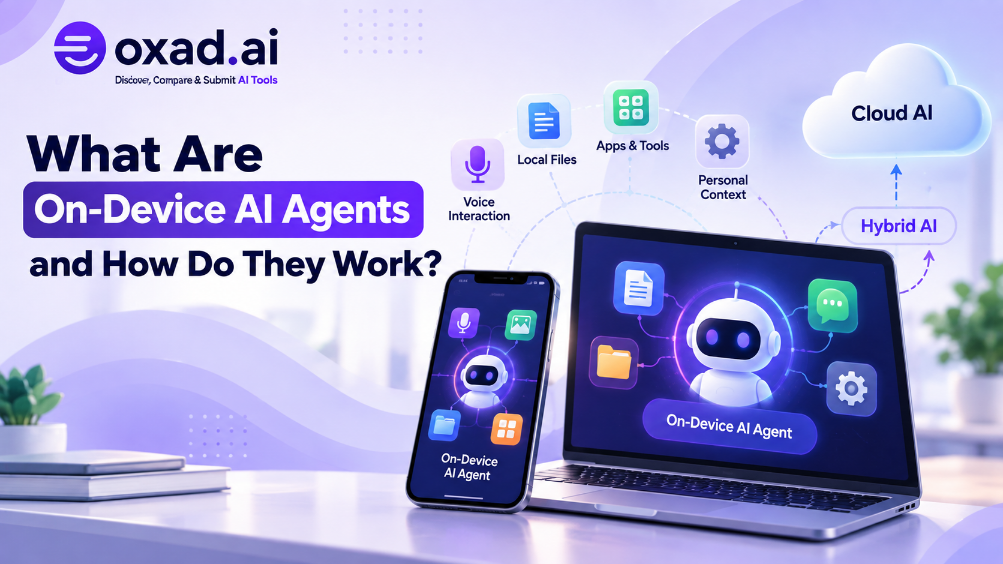
On-device AI agents are AI agents that can perform some or all of their reasoning and actions directly on the device where the user interacts with them. Instead of sending every request to a remote server, the device can run a local model and connect it to local tools, files, applications, sensors, or other device capabilities.
For example, imagine an assistant on a laptop that can read a folder of local documents, summarize them, rename files, draft an email, and organize a calendar task. A cloud-only agent may send much of that information to a remote service. An on-device agent can keep more of the processing on the computer.
On-device does not necessarily mean that the agent never uses the internet. A local agent can still call cloud services when a task requires a larger model, current information, or a capability that is not available locally.
How Do On-Device AI Agents Work?
A simple cloud agent can be represented as:
User → Cloud Model → Tool → Result
An on-device agent changes the architecture:
User → Local Model → Local Agent → Local Tools
A hybrid architecture can combine both:
User → Local Agent → Local Model → Local Tools → Cloud Model when needed
The local agent acts as an execution layer. It can decide which information should stay on the device, which tools can be used locally, and when a request should be delegated to a remote model.
A Simple Example
Suppose you ask an AI assistant to find a document containing a specific project name and summarize it.
The local agent receives your request.
A local model interprets the request.
The agent searches files stored on your device.
The relevant document is processed locally.
The summary is returned without necessarily sending the document to a cloud service.
If you then ask the same agent to perform a complex research task across the live web, it could route that part of the workflow to a cloud model or online tool.
Why Are AI Agents Moving Toward the Device?
The shift is being driven by several changes happening at the same time: more capable local models, faster NPUs and GPUs, better local runtimes, and growing demand for personal AI that can work with sensitive context.
1. Privacy
Local execution can reduce the amount of personal information that needs to leave the device. Files, voice input, personal context, and other sensitive data can sometimes be processed locally instead of being transmitted to a remote inference service.
However, on-device does not automatically mean private. Privacy still depends on the applications, permissions, telemetry, network connections, model behavior, and services used by the agent.
2. Lower Latency
A local operation does not always need to make a round trip to a remote server. This can make interactions feel faster, especially for short tasks such as voice processing, classification, file search, or simple automation.
Qualcomm has recently highlighted on-device agentic experiences across smartphones, PCs, earbuds, and cars, while its September architecture work specifically describes local processing as a way to keep agents responsive while they handle context and multiple tasks. Qualcomm’s discussion of the Hexagon NPU provides a current example of this direction.
3. Offline Capability
Some local agents can continue working when the internet is unavailable. This is especially useful for tasks that depend on information already stored on the device.
Offline capability does not mean that every agent task can work offline. Web research, online transactions, cloud APIs, and services requiring fresh information still need connectivity.
4. More Control Over Data
When computation happens locally, users and organizations can have more direct control over where certain information is processed and stored. This can be important for personal data, proprietary documents, source code, and internal workflows.
On-Device AI vs Cloud AI: What Is the Difference?
Factor
On-Device AI Agent
Cloud AI Agent
Processing
Primarily on the user’s hardware
Primarily on remote servers
Internet
May work offline for some tasks
Usually required
Privacy
More data can remain local
Data may be processed remotely
Latency
Can be low for local tasks
Depends partly on network conditions
Model size
Often constrained by device resources
Can use much larger models
Hardware
Depends on CPU, GPU, NPU, RAM, and storage
Server infrastructure handles most compute
The important point is that these models are not mutually exclusive. A device can perform small, frequent, or sensitive operations locally and send demanding tasks to the cloud.
Why Is Hybrid AI Becoming Important?
Hybrid AI combines local and cloud execution inside the same workflow. Instead of forcing every task into one environment, the agent chooses where a task should run based on its requirements.
Local-first tasks: voice commands, notifications, personal context, local files, simple automation, device control, and other privacy-sensitive operations.
Cloud-assisted tasks: complex reasoning, large-scale research, heavy coding, advanced generation, or workloads that exceed local hardware capabilities.
This creates a more flexible architecture:
Local Agent → Decide → Local execution OR Cloud execution → Result
The agent becomes an intelligent router as well as an assistant.
Are On-Device AI Agents Already Practical?
Yes, although the practical level depends heavily on the device and the task.
In September 2026, several developments illustrate the direction. NVIDIA announced easier local agent installation and support for distributing inference across multiple RTX systems on a local network through its Personal AI Router (PAIR). NVIDIA’s September local AI announcement describes local agents, faster inference, and multi-PC inference routing.
NVIDIA also introduced local support for Perplexity’s Portable Computer on compatible RTX Windows PCs. The system can perform multi-step work locally while allowing more advanced research and reasoning to be delegated to cloud models when necessary. NVIDIA’s Portable Computer announcement is an example of this hybrid approach.
Google has also been moving agentic workflows toward local execution. In September 2026, Google announced local model support in the Antigravity SDK, including an offline workflow using Gemma and Google AI Edge’s LiteRT. Google’s local AI models announcement shows how local model execution is becoming part of agent development workflows.
Can AI Agents Work Offline?
Some can, but only within the capabilities available locally.
An offline agent can work with local models, local files, installed tools, cached knowledge, and device functions. It cannot independently perform tasks that require a live website, remote API, cloud-only model, or current online information.
This distinction is important because “offline AI agent” does not mean an AI system with unlimited capabilities. It means the agent has enough local models, tools, data, and compute to complete a particular class of tasks without a network connection.
What Is the Role of AI PCs, NPUs, and Smartphones?
On-device agents need hardware capable of running AI workloads efficiently. Modern AI PCs and smartphones increasingly include dedicated neural processing hardware designed to accelerate machine-learning operations.
NPUs are particularly relevant because they can handle certain AI workloads efficiently without placing all the work on the CPU or GPU. This matters for agents that need to remain responsive while other applications are running.
Qualcomm’s September 2026 announcements are a strong example of this hardware direction: its Snapdragon platforms are being positioned for personalized agentic experiences directly on mobile devices and PCs. Qualcomm’s Snapdragon Summit coverage describes local agentic AI across PCs and mobile platforms.
What Are the Main Limitations of On-Device AI Agents?
Local execution also introduces important trade-offs.
Compute limits: smaller devices cannot run every model efficiently.
Memory limits: larger models require substantial RAM or unified memory.
Energy use: continuous local inference can affect battery life.
Model capability: a smaller local model may be less capable on difficult reasoning tasks.
Maintenance: local models, runtimes, and tools need updates.
Security: giving an agent access to local files and applications creates a new permission boundary.
Recent research and engineering work increasingly treats local agent efficiency as an engineering problem rather than simply asking whether local inference is possible. The challenge is to balance model capability, memory, latency, energy, privacy, and reliability.
How Are Local AI Agents Different From Edge AI?
The terms are related but not identical.
Concept
Meaning
On-device AI
AI processing performed directly on a personal or embedded device.
Local AI
AI models or workloads running in a local environment rather than primarily in the cloud.
Edge AI
AI processing closer to where data is generated, which can include phones, cameras, vehicles, industrial devices, and gateways.
Hybrid AI
A system that combines local and cloud processing.
How Do On-Device Agents Change Personal AI?
The biggest change may be the relationship between an AI assistant and the device itself.
Instead of opening an AI application and sending a prompt, users could increasingly interact with an agent that already understands parts of their local context.
For example, a personal agent could combine:
Voice input and output
Local files and documents
Calendar and notifications
Application state
Device sensors
Personal preferences
Local automation
This connects naturally with technologies already appearing across the AI ecosystem. AI voice interaction can provide the interface, AI agent context can help organize information, and AI agent workflows can turn instructions into repeatable actions.
What Does This Mean for AI Coding Agents?
Coding is one of the clearest areas for local agents because developers often work with sensitive source code, configuration files, local repositories, and development environments.
A local coding agent can inspect a repository, understand project files, run commands, and make changes without sending every file to a remote service. When more advanced reasoning is needed, the workflow can still delegate selected tasks to a cloud model.
Local AI coding agents are therefore part of a wider transition toward AI systems that operate closer to the user’s working environment.
What Could the Future of On-Device AI Agents Look Like?
The likely direction is not simply “everything becomes local.” Instead, AI systems can become more selective about where computation happens.
A future agent may automatically decide:
What information should remain on the device.
Which model is sufficient for a task.
When a local model is fast enough.
When a cloud model is worth the extra capability.
Which tools require internet access.
Which actions need explicit user approval.
This could make the agent less like a chatbot and more like a distributed personal computing layer.
The larger shift: AI agents are increasingly becoming part of the device architecture itself. The important question is no longer only which model an agent uses, but where the model runs, which data it can access, and which actions it can perform locally.
Frequently Asked Questions
What are on-device AI agents?
They are AI agents that can perform agentic tasks using models and tools running directly on a device.
Can AI agents work without the internet?
Yes, for tasks supported by local models, data, tools, and device capabilities.
Are local AI agents more private?
They can keep more processing local, but privacy still depends on the complete software architecture.
Are on-device AI agents faster than cloud agents?
They can have lower latency for suitable local tasks because network round trips are reduced.
Can a local AI agent use cloud models?
Yes. Hybrid agents can route difficult tasks to cloud models while keeping other tasks local.
What hardware is needed for local AI agents?
Requirements vary from smartphones to AI PCs with GPUs, NPUs, sufficient RAM, and fast storage.
What is the difference between local AI and edge AI?
Local AI usually describes local model execution, while edge AI covers processing closer to where data is generated.
Conclusion: Are AI Agents Moving From the Cloud to Your Device?
On-device AI agents represent a shift toward AI that can operate closer to the user, the data, and the applications where work actually happens.
The most useful model may not be completely local or completely cloud-based. A hybrid architecture can use local AI for privacy, responsiveness, offline tasks, and personal context while using cloud AI for demanding reasoning, research, and generation.
As local models improve and AI hardware becomes more capable, the distinction between “AI service” and “AI built into the device” is likely to become less obvious.
The result is a new way to think about personal AI: not just a model in the cloud, but an agent distributed across your device, your local environment, and the cloud.