What Is an AI Agent Computer and How Does It Work?
The next generation of AI agents may not just use computers. They may operate inside computers of their own. Recent developments from OpenAI, NVIDIA, and Manus point toward a new layer of agent infrastructure: persistent computing environments where agents can browse, use tools, access files, run code, and continue working after the user steps away.
For years, AI assistants mainly followed a simple pattern: you asked a question, the model generated an answer, and you performed the next action yourself. AI agents changed that by allowing models to call tools and take actions. The latest shift goes one step further: the agent can have a computing environment in which those actions happen.
OpenAI’s September 29, 2026 DevDay announcements brought this idea into the spotlight with Dots, which OpenAI describes as always-on agents with their own cloud computer and browser. OpenAI says Dots can connect to more than 4,000 apps through its ecosystem and continue working toward user goals in the background. At the same time, OpenAI expanded cloud-based Codex environments, while Manus 2.0 introduced dedicated Cloud Computers for projects and NVIDIA announced an agent safety platform built around runtime isolation and hardware-level monitoring.
What Is an AI Agent Computer?
An AI agent computer is a dedicated or isolated computing environment that gives an AI agent a place to perform work rather than merely generate responses.
Depending on the system, that environment can include a virtual machine, sandbox, browser, filesystem, command-line tools, applications, network access, credentials, persistent storage, and execution processes.
The important distinction is that the computer becomes part of the agent’s operating environment. The model decides what to do, while the environment provides the controlled resources needed to actually do it.
AI Architecture
Typical Flow
Traditional AI
User → Model → Answer
AI Agent
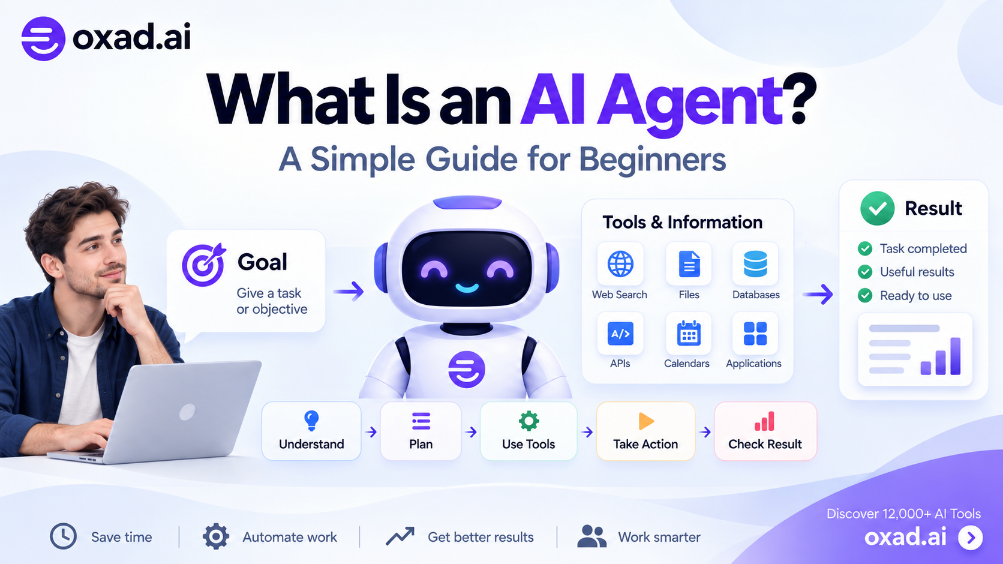
User → Agent → Tools → Action → Result
AI Agent with a Computer
User → Agent → Computer → Browser / Files / Apps / Code → Result
Why Do AI Agents Need Their Own Computers?
An agent can call an API without owning a computer, but increasingly complex tasks require a place where software can execute, files can persist, browsers can operate, and processes can continue running.
Consider an AI coding agent. It may need to clone a repository, inspect files, install dependencies, run tests, start a development server, inspect logs, modify code, and repeat the process. That workflow is much easier to manage when the agent has an isolated execution environment.
The same principle applies to research, business automation, web operations, data processing, and long-running workflows.
1. A place to execute work
The agent needs somewhere to run commands, scripts, applications, and other tools. A cloud computer or sandbox can provide this execution layer.
2. A filesystem and project state
Complex work produces files, intermediate results, configuration, logs, and artifacts. A persistent environment can preserve that state between sessions or tasks.
3. A browser
Computer-use agents can interact with websites through a browser rather than relying only on structured APIs. This makes more web-based workflows accessible, but it also increases the need for strict permissions.
4. Long-running execution
If an agent is expected to work for hours or continue after a user’s laptop is closed, the execution environment cannot depend on the user’s local machine being awake.
5. Isolation
An agent that can execute code should not automatically have unrestricted access to a user’s personal computer, files, credentials, or network. Isolation creates a boundary between the agent’s workspace and everything outside it.
What Did OpenAI Announce With Dots?
On September 29, 2026, OpenAI announced Dots at DevDay 2026. OpenAI described Dots as always-on agents powered by Astra that have their own cloud computer and browser, can learn from feedback, and can work toward goals in the background.
OpenAI also said Dots can connect to more than 4,000 apps through its ecosystem. They can be reached through ChatGPT and integrations such as Slack and Microsoft Teams, allowing users to delegate work without keeping a browser tab open throughout the task.
This matters architecturally because the important announcement is not simply that the model became more capable. The agent is being paired with an environment in which it can actually operate.
OpenAI has also expanded cloud execution for Codex. Its September 29 enterprise release notes describe reusable cloud environments that can be shared and used to start or continue Codex tasks from desktop, web, or mobile, with isolated workspaces for tasks that can continue while a user’s computer is asleep.
These developments suggest a broader direction: agent execution is becoming less dependent on the developer’s or user’s local machine.
How Does an AI Agent Computer Work?
A simplified architecture looks like this:
1. Model → reasons about the task
2. Agent Harness → manages the loop, tools, context, and state
3. Policy Layer → determines what the agent is allowed to do
5. External Systems → websites, APIs, SaaS applications, repositories, databases, and other services
The agent receives a goal, plans actions, calls tools, and receives observations from its environment. The loop can continue until the task is complete, an approval is required, or a policy blocks an action.
AI Agent Computer vs. AI Agent Harness
An agent computer and an agent harness solve different problems.
Layer
Main Responsibility
Model
Reasoning and decision generation
Agent harness
Agent loop, tools, context, state, and orchestration
Agent computer
Execution environment and computing resources
Security layer
Permissions, isolation, monitoring, credentials, and policy enforcement
This is why AI agent infrastructure is becoming an important concept. The harness controls the agent loop, while the computer provides the environment in which the loop operates.
Why Is NVIDIA’s Agent Safety Platform Important?
Giving agents computers creates a new security problem: what happens when an agent has enough authority to affect the environment it controls?
On September 28, 2026, NVIDIA announced its Open Agent Safety Platform. The platform combines NVIDIA OpenShell, an open secure runtime, with NVIDIA Sentry, a reference design for monitoring and enforcement using BlueField-4 DPUs.
NVIDIA describes OpenShell as a runtime boundary that can govern agent execution, file access, network access, tools, processes, and credentials. Sentry adds an independent monitoring and enforcement layer outside the agent’s own software environment.
The architecture highlights an important principle: an autonomous agent should not be the only component responsible for controlling itself.
If AI Agents Get Computers, What Should They Be Allowed to Access?
An AI agent computer should be treated as a permissioned environment, not as an unrestricted machine.
Resource
Questions to Control
Files
Which directories can the agent read or modify?
Network
Can it access the open internet or only approved domains?
Credentials
Which accounts can it use and for which actions?
Applications
Which software can it launch or control?
Browser
Which websites and authenticated sessions are available?
Human approval
Which sensitive actions require confirmation?
How Does a Cloud Computer Differ From a Sandbox?
The terms are related but are not identical.
A sandbox primarily emphasizes isolation and controlled execution. A cloud computer emphasizes a usable computing environment that can remain available for longer periods and may contain persistent files, software, and processes.
A temporary sandbox may disappear after a task. A persistent cloud computer can remain available between tasks. In practice, an agent platform may combine both ideas: a persistent workspace with sandboxing and policy controls around what the agent can access.
What Does Manus 2.0 Add to the Trend?
Manus 2.0, announced on September 28, 2026, provides another example of the same architectural direction. Manus describes its Cloud Computer as a dedicated environment for projects that need a place to remain active, including servers and automations. It also introduced event-triggered Automations and a new agent harness called Cascade.
This is significant because it shows that persistent computing environments are not limited to one AI company. Different agent platforms are converging on the idea that complex autonomous work needs a place where it can continue operating.
How Do AI Coding Agents Use Agent Computers?
Coding is one of the clearest examples because software development already requires an execution environment.
An AI coding agent may need to:
Clone or access a repository.
Read and modify source code.
Install dependencies.
Run tests and build commands.
Start development servers.
Inspect logs and errors.
Open documentation or websites.
Create commits, patches, or pull requests.
Tools such as AI coding agents therefore benefit from a controlled environment where code can execute without automatically receiving unrestricted access to the developer’s entire machine.
For long-running coding tasks, the combination of a harness, persistent workspace, model routing, tools, and sandbox can become a complete autonomous development environment.
What Role Does Context Play?
A computer gives an agent a place to work, but the agent still needs the right information to work effectively.
Repositories, documents, previous decisions, project rules, user preferences, and task history can become part of the agent’s working context. This is where AI agent context becomes important.
The emerging architecture can therefore be viewed as several connected layers:
Model → intelligence
Context → information
Harness → orchestration
Computer → execution
Tools → capabilities
Security → boundaries
Does an AI Agent Computer Mean the Agent Is Fully Autonomous?
No. Giving an agent a computer does not automatically make it autonomous or trustworthy.
Autonomy depends on the model, agent loop, available tools, permissions, memory, environment, policies, monitoring, and the task itself.
A useful distinction is between capability and authority. An agent may be capable of sending an email, deleting a file, changing code, or purchasing a service. That does not mean it should have permission to perform those actions without approval.
What Are the Main Risks of Agent Computers?
Prompt injection
A webpage, document, repository, or message can contain instructions designed to manipulate an agent. A browser-enabled agent therefore needs protections against untrusted instructions.
Credential exposure
Agents increasingly interact with authenticated services. Credentials should be isolated and exposed only through controlled mechanisms.
Excessive permissions
If an agent receives broad filesystem, network, or application access, a single mistake can have a much larger impact.
Long-running drift
The longer an agent operates, the more opportunities it has to encounter unexpected states, ambiguous instructions, or external content that changes its environment.
Sandbox escape
If the execution boundary itself is compromised, the agent may gain access beyond its intended environment. This makes runtime isolation a core part of agent security rather than an optional add-on.
Are AI Agent Computers the Next Step in Agentic AI?
The recent announcements point to a clear architectural progression, although the industry is still developing the terminology and implementations.
Stage
What Changes?
AI Model
Generates and reasons about information.
AI Agent
Uses tools and takes actions.
Agent Computer
Gets a persistent or isolated environment for execution.
Autonomous Work
Can continue across time, applications, and devices.
The interesting part is not that every agent will literally own a virtual desktop. The deeper change is that computing resources are becoming an explicit part of the agent architecture.
What Could the Agent Computer Look Like in the Future?
Future agent environments may combine persistent files, browsers, application connections, databases, memories, scheduled tasks, model routing, specialized tools, and security policies into a single workspace.
An agent could start a task on a phone, continue it in the cloud, access a repository, use a browser, call specialized models, run code in a sandbox, and return the results to the user later. The user would not necessarily need to know which machine or model handled each individual step.
This is also where AI agent workflows become more interesting. The workflow is no longer just a sequence of API calls. It can become an ongoing environment in which the agent observes, plans, executes, stores state, and waits for the next event.
Frequently Asked Questions
What is an AI agent computer?
An AI agent computer is a dedicated or isolated computing environment where an AI agent can execute tasks, use applications, access files, browse the web, and run software.
Do AI agents need their own computers?
Not always. Simple agents can operate through APIs and tools, but complex and long-running tasks increasingly benefit from dedicated execution environments.
Is an AI agent computer the same as a virtual machine?
Not necessarily. A virtual machine can provide the underlying environment, while an AI agent computer describes the broader execution workspace and controls available to the agent.
What is the difference between an AI agent computer and a sandbox?
A sandbox focuses on isolation and restrictions, while an agent computer can describe a broader environment that includes execution, files, applications, browsers, and persistent state.
Can an AI agent use a browser on its own computer?
Yes. Browser access allows an agent to interact with websites and web applications, subject to the permissions and policies of the platform.
Are AI agent computers secure?
They can be designed with strong isolation, permission controls, monitoring, and human approval, but a computing environment does not automatically make an agent secure.
Why are cloud computers useful for AI agents?
Cloud environments can remain available while a user’s device is offline, allowing agents to continue long-running tasks without depending on a local computer.
Will AI coding agents use their own computers?
Many already use isolated execution environments. Persistent cloud workspaces can make longer coding tasks easier to continue across devices.
Conclusion
The emerging AI architecture is moving beyond the idea of a model that simply answers questions. Agents are gaining tools, memory, context, execution environments, browsers, files, and increasingly persistent computing resources.
OpenAI’s Dots, cloud-based Codex environments, Manus 2.0’s Cloud Computer, and NVIDIA’s Open Agent Safety Platform illustrate different parts of this shift. Together, they point toward an important question for the next generation of AI: when an agent has a computer of its own, the computer becomes part of the agent’s identity, capabilities, and security boundary.
I like the idea of separating the agent from my personal computer. A dedicated environment makes it much easier to understand what the agent can access and what it should not be allowed to touch.
Sophia Lee
Question: Does an AI agent computer have to be a full virtual machine? From this article, it seems the important part is the controlled execution environment, not necessarily the specific virtualization technology.
Michael Turner
The connection between agent computers and security is probably the most important part. Once an agent can browse, use files, and run code, permissions and isolation become just as important as the model itself.
Emma Wilson
The AI coding example makes a lot of sense. A persistent cloud workspace could let a coding agent keep running tests and fixing issues even when the developer closes their laptop.



4 Replies to “What Is an AI Agent Computer and How Does It Work?”
I like the idea of separating the agent from my personal computer. A dedicated environment makes it much easier to understand what the agent can access and what it should not be allowed to touch.
Question: Does an AI agent computer have to be a full virtual machine? From this article, it seems the important part is the controlled execution environment, not necessarily the specific virtualization technology.
The connection between agent computers and security is probably the most important part. Once an agent can browse, use files, and run code, permissions and isolation become just as important as the model itself.
The AI coding example makes a lot of sense. A persistent cloud workspace could let a coding agent keep running tests and fixing issues even when the developer closes their laptop.