Gemini vs Gemini Intelligence: What’s the Difference and Why It Matters for Android
Google AI Guide • 2026
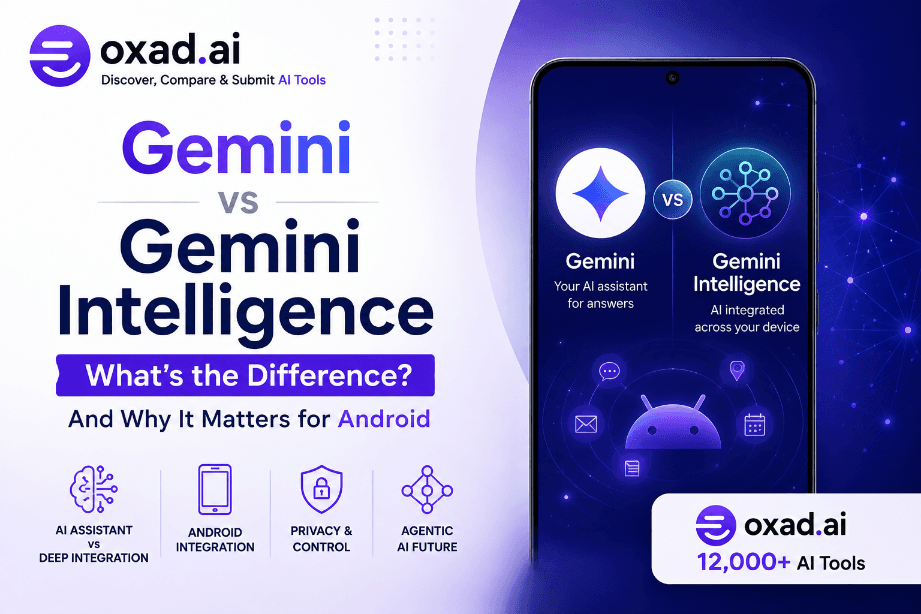
Google is using the Gemini name for several closely connected parts of its AI ecosystem, which can make the terminology confusing. Gemini refers to Google’s AI models and assistant experience, while Gemini Intelligence describes a broader approach to bringing AI capabilities deeper into Android and compatible devices.
The distinction matters because Google’s AI strategy is moving beyond the traditional chatbot. Instead of requiring users to open an AI application and manually enter every request, Google is working toward an Android experience in which AI can understand context, assist across applications, and help complete practical tasks.
Gemini
Google’s AI models and assistant experience
Gemini Intelligence
Deeper AI integration across Android
Main Focus
From answering questions to helping complete tasks
The Short Answer
Gemini is the AI platform and assistant. Gemini Intelligence is Google’s broader strategy for embedding that intelligence more deeply into Android, allowing compatible devices to provide more contextual and proactive assistance.
What Is Google Gemini?
The name Gemini can refer to multiple layers of Google’s artificial intelligence ecosystem. Most importantly, it is the name used for Google’s family of AI models and its consumer-facing AI assistant.
For everyday users, the easiest way to understand Gemini is as Google’s general-purpose AI assistant. It can answer questions, help write and summarize content, support research, assist with planning, and perform a growing range of tasks across Google’s services.
Gemini has also evolved considerably beyond the basic chatbot experience. Google has been integrating its AI technology into Android, Chrome, Search, Workspace, and other products. This expansion is important because it changes the role of Gemini from a standalone destination into an intelligence layer that can appear throughout the user’s digital environment.
Think of Gemini as the AI Foundation
When you open the Gemini application and ask Google’s AI a question, you are using the Gemini experience. The underlying models provide the intelligence, while the application gives users a direct interface for interacting with that intelligence.
What Can You Use Gemini For?
Gemini can support a wide range of everyday activities. Its usefulness depends on the specific model, product, account, and feature available to the user, but common applications include:
Answering questions and explaining concepts.
Writing and rewriting text.
Summarizing information.
Brainstorming ideas.
Planning activities and projects.
Analyzing information.
Working with supported images and other content.
Assisting with research and productivity tasks.
The important point is that Gemini describes the AI experience itself. Gemini Intelligence goes one step further by describing how that intelligence can become integrated into the operating environment.
What Is Gemini Intelligence?
Gemini Intelligence is not simply another Gemini model. It refers to Google’s broader effort to integrate Gemini-powered capabilities deeply into Android and compatible devices.
The traditional chatbot model requires the user to recognize that AI could help, open an application, write a prompt, and then act on the answer. Gemini Intelligence is designed around a different idea: the operating system itself can become more intelligent and provide assistance across different parts of the device.
This means AI can potentially help with tasks that involve multiple applications, information sources, and steps. Instead of merely generating an answer, the system can assist the user in accomplishing an objective.
The Key Concept
Gemini Intelligence should therefore be understood as an integration and product strategy rather than a completely separate chatbot. Its purpose is to make Gemini capabilities more deeply connected to the device, applications, and context in which people actually work.
From Conversation to Action
The difference becomes easier to understand when comparing two simple scenarios.
Traditional Gemini Interaction
You open Gemini, ask a question, receive an answer, and then decide what to do next. The user remains at the center of every step.
Gemini Intelligence Approach
AI capabilities can be integrated into the device and workflow, helping with tasks across supported applications instead of functioning only as a separate conversational destination.
Gemini vs Gemini Intelligence: The Main Difference
The simplest distinction is AI assistant versus integrated intelligence. Gemini provides the underlying AI experience, while Gemini Intelligence describes a broader implementation in which that intelligence becomes part of the operating environment.
Gemini
Gemini Intelligence
AI models and assistant experience
Deeper AI integration across compatible devices
Often begins with a direct user request
Designed to provide more contextual assistance
Strong focus on conversation and generation
Strong focus on actions and workflows
Can be accessed through Gemini experiences
Depends on compatible hardware, software, and integrations
Simple Example
Imagine you want information from a webpage. With a conventional Gemini interaction, you can ask Gemini to summarize the content. With the Gemini Intelligence approach, Google’s goal is to integrate AI capabilities more directly into products such as Chrome and Android so that summarization, comparison, form completion, and other supported actions can become part of the workflow itself.
What Can Gemini Intelligence Do?
The most important difference between a conventional AI assistant and an intelligence layer built into an operating system is what happens after the initial question. Gemini can generate information, ideas, and answers, while Gemini Intelligence is designed to connect AI capabilities with the user’s device and supported workflows.
Google’s approach includes several capabilities intended to make Android more useful in everyday situations. The exact features available can depend on the device, software version, region, and Google’s rollout schedule, so users should not assume that every Gemini Intelligence capability is available on every Android phone.
Multi-Step Assistance
AI can help with workflows that involve several steps rather than simply answering one question. This moves the experience closer to an AI agent capable of helping users accomplish an objective.
Contextual Help
The deeper integration allows AI assistance to become more relevant to the context in which the user is working, rather than treating every request as an isolated conversation.
Content Understanding
Supported Google products can use Gemini capabilities to understand and summarize content, helping users process information without manually moving everything into a separate AI application.
Personalized Experiences
Google is also exploring more personalized AI experiences, including interfaces and device features that can be adapted to the user’s needs and preferred workflows.
AI That Can Help With More Than One Step
One of the broader goals behind Gemini Intelligence is to make AI more capable of handling tasks that traditionally require several manual actions. For example, a user may have an objective that involves finding information, comparing options, entering information, and then completing a final action.
An ordinary chatbot can explain how to perform those steps. A more integrated AI system aims to help execute supported steps itself. That distinction is central to the industry’s transition from generative AI toward agentic AI.
From Answers to Actions
The strategic goal is not simply to make Gemini better at answering questions. Google wants its AI to become useful across the entire workflow, helping users move from an idea or request to a completed task when the relevant integrations and permissions are available.
Why Android Is Central to Google’s AI Strategy
Android gives Google something that a standalone chatbot cannot easily reproduce: direct access to an operating environment used across smartphones and other devices. This creates an opportunity to place AI assistance closer to the applications, information, and actions users already interact with every day.
Instead of asking users to decide when AI might be useful, an integrated system can make assistance available within the context of the task itself. That could mean helping users understand information displayed on screen, interact with supported applications, or automate parts of a workflow.
This approach also changes the competitive landscape. Google is not only competing with other chatbot providers; it is competing to make Android itself a more intelligent computing platform.
Why Device Integration Matters
AI can become available closer to where the user is already working.
Supported applications can provide richer context for AI-assisted tasks.
Multi-step workflows can become easier to automate.
Users may need fewer separate AI applications to complete everyday tasks.
Android can evolve from a traditional operating system into a more intelligent computing environment.
Which Devices Can Use Gemini Intelligence?
One of the most important practical questions is compatibility. Gemini Intelligence should not be treated as a feature that automatically appears on every Android smartphone simply because the device can run the Gemini application.
Advanced AI features can depend on a combination of hardware capabilities, memory, processor or AI acceleration, Android software versions, Google’s services, and regional availability. Google can also introduce capabilities gradually rather than releasing every feature to every device simultaneously.
This means two Android phones can both support Gemini while offering different levels of Gemini Intelligence functionality.
Gemini Does Not Automatically Mean Gemini Intelligence
A phone may support the Gemini assistant without supporting every advanced system-level capability associated with Google’s newer intelligence strategy. Availability should therefore be checked on the specific device rather than inferred from the presence of the Gemini app alone.
Why Hardware Matters
Modern AI features can require substantial processing power. Some tasks can be handled through Google’s cloud infrastructure, while others may benefit from processing directly on the device. Local processing can improve responsiveness and may offer privacy advantages for certain workloads, but it also requires sufficiently capable hardware.
This is one reason Google’s AI strategy increasingly involves both software and hardware. The future Android experience is likely to depend not only on increasingly capable Gemini models but also on phones designed to execute AI workloads efficiently.
Privacy and User Control
Deeper AI integration also creates an important question: how much information should an AI system be allowed to access?
A chatbot that receives only the text a user enters has a relatively narrow information boundary. An AI assistant integrated into an operating system can potentially interact with more context, applications, content, and device functions. That can make the assistant more useful, but it also makes permissions and user control increasingly important.
Users should therefore pay attention to the permissions, account settings, connected services, and privacy controls associated with Gemini and Android features. Availability and controls can change as Google expands the technology.
A Practical Privacy Rule
The more context an AI assistant can access, the more important it becomes to understand what information it can use, which applications are connected, what actions it can perform, and what controls are available to the user.
What Google’s Gemini Strategy Could Mean for Android
The distinction between Gemini and Gemini Intelligence becomes especially important when looking at Google’s long-term vision for Android. The company is moving from an AI assistant that users deliberately interact with toward a more integrated computing experience in which artificial intelligence can help across different parts of the device.
This does not mean that Android will suddenly operate without user input. Instead, the direction points toward a more capable assistant that can understand the user’s intent, work with relevant context, and help complete supported tasks while keeping the user in control.
The broader shift is significant because it changes what people may expect from smartphones. Instead of treating AI as a separate application, users could increasingly encounter AI capabilities directly inside the tools they already use.
The Bigger Shift
The next stage of mobile AI is likely to be defined less by how well a chatbot answers questions and more by how effectively AI can understand context, connect services, and help users accomplish real-world tasks.
Gemini Intelligence vs Traditional AI Assistants
Traditional AI assistants generally follow a simple pattern: the user asks a question, the assistant generates a response, and the user decides what to do next. This model remains useful, but it can become inefficient when a task requires multiple applications or repeated manual actions.
An integrated intelligence system attempts to reduce that friction. The assistant can potentially understand more of the user’s context and help connect different steps in a workflow. The result is closer to an AI agent than a conventional chatbot.
Capability
Traditional AI Assistant
Integrated AI Approach
Interaction
User starts a conversation
AI can be available within the workflow
Context
Primarily the information provided to the assistant
Can use supported device and application context
Tasks
Answers and content generation
Assistance with multi-step workflows
Integration
Often accessed through a dedicated app
Designed to work across supported system experiences
What Users Should Expect in Practice
For users, the most important difference may not be the terminology itself. What matters is whether Gemini becomes genuinely more useful during everyday activities.
If Google’s approach works as intended, users will spend less time thinking about which AI tool to open and more time simply asking the device to help with a task. The AI could increasingly become an invisible layer connecting information and actions across supported services.
However, this transition will not happen equally for everyone. Device compatibility, software updates, available integrations, account settings, and regional rollout policies can all influence which features a particular user receives.
For Everyday Users
The main benefit is convenience: fewer manual steps and easier access to AI assistance while using the phone.
For Power Users
Deeper integrations could make Android more useful for research, productivity, communication, and complex workflows.
For Developers
The expansion of system-level AI creates opportunities for applications to become part of more intelligent, context-aware workflows.
Is Gemini Intelligence a New AI Model?
No. This is one of the most important points to understand. Gemini Intelligence should not be interpreted as a direct successor to Gemini’s underlying language models.
The terminology describes how Google’s AI capabilities are being integrated into products and devices. The underlying Gemini models remain part of the technology stack, while Gemini Intelligence represents a broader product and system-level direction.
Common Misunderstanding
It would be misleading to describe Gemini Intelligence as simply “another Gemini model.” The more accurate explanation is that Google is using Gemini technology to build a deeper intelligence layer across compatible Android experiences.
Why the Distinction Matters
Understanding the terminology is useful because Google’s AI products are becoming increasingly interconnected. A user who thinks of Gemini only as a chatbot may miss the larger transformation taking place across Android.
The strategic direction is similar to the wider movement toward agentic AI, where systems do more than generate text. They can reason about objectives, interact with tools, use context, and potentially complete multiple steps on behalf of the user.
For Google, Android provides an especially strong foundation for this strategy because the company controls both a major mobile operating system and a large ecosystem of services. The combination creates opportunities for AI capabilities that standalone chatbot providers cannot easily reproduce.
Oxad.ai Analysis
The real significance of Gemini Intelligence is therefore not the name itself. The important development is Google’s attempt to turn AI from a destination users visit into an intelligence layer that can operate throughout the computing environment. If the approach becomes mature and reliable, it could change how people interact with Android devices.
Frequently Asked Questions
Is Gemini the same as Gemini Intelligence?
No. Gemini refers to Google’s AI models and assistant ecosystem, while Gemini Intelligence describes a broader approach to integrating Gemini capabilities more deeply into Android and compatible products.
Is Gemini Intelligence a separate AI model?
No. It is better understood as an integration and product strategy built around Google’s Gemini technology rather than as a completely separate language model.
Does every Android phone support Gemini Intelligence?
No. Advanced capabilities can depend on hardware, software version, memory, processor capabilities, supported Google services, account settings, and regional availability.
Can I use Gemini without Gemini Intelligence?
Yes. Gemini can be available as an AI assistant even when a particular Android device does not support every advanced system-level capability associated with Gemini Intelligence.
Why is Google integrating Gemini into Android?
Deeper integration can make AI assistance more convenient and contextual. Instead of requiring users to switch to a separate chatbot for every task, AI capabilities can become available within supported Android workflows.
Final Verdict: Gemini vs Gemini Intelligence
The difference between Gemini and Gemini Intelligence is easier to understand once the two terms are placed in context. Gemini is Google’s AI ecosystem and assistant experience, while Gemini Intelligence represents a broader move toward integrating that intelligence directly into Android and supported Google products.
For users, this means the future of Google’s AI strategy is not limited to asking a chatbot questions. The company is working toward an experience where AI can understand more context, interact with supported services, and help users complete tasks with fewer manual steps.
The distinction is therefore less about choosing between two competing AI models and more about understanding two layers of Google’s strategy: Gemini provides the intelligence, while Gemini Intelligence describes how that intelligence can become part of the computing environment.
What This Means for the Future of Android
The evolution of Gemini could have a significant impact on how people interact with smartphones. For years, mobile applications required users to open specific apps and manually perform individual tasks. AI introduces the possibility of a different interaction model in which users describe an objective and the system helps coordinate the required steps.
This could eventually make the operating system itself more conversational and context-aware. Instead of thinking about which application contains a particular function, users may increasingly describe what they want to accomplish and allow the AI layer to identify the appropriate tools.
However, this transition also introduces challenges. Reliability, privacy, permissions, security, device compatibility, and user control become more important as AI moves closer to the operating system.
The Key Challenge
A useful AI assistant must not only understand what the user wants. It must also know when it should act, when it should ask for confirmation, and when it should leave the decision entirely to the user. Greater automation therefore needs to be balanced with transparency and control.
Gemini Intelligence and the Rise of Agentic AI
The direction represented by Gemini Intelligence is closely connected to the industry’s broader movement toward agentic AI. Traditional generative AI primarily creates content or answers questions. Agentic systems aim to reason about objectives and use available tools to accomplish tasks.
This does not mean every Gemini Intelligence feature is an autonomous agent. Rather, the technology reflects the same general direction: AI is moving from generating an answer toward helping users complete an outcome.
Generative AI
Creates text, images, summaries, ideas, and other content in response to user requests.
Agentic AI
Uses reasoning, tools, and multiple steps to help achieve a defined objective.
Integrated AI
Places AI capabilities directly within the operating system and applications users already depend on.
What Users Should Check Before Buying a New Android Phone
The emergence of Gemini Intelligence adds another factor for consumers considering an Android upgrade. A phone’s AI capabilities should not be judged solely by whether it supports the Gemini application.
Potential buyers should also consider the device’s processor and AI acceleration capabilities, memory, software support period, Android version, Google service compatibility, and the availability of advanced AI features in their region.
Because Google’s AI features are evolving rapidly, a device that supports one capability today may receive additional functionality through future software updates. Conversely, some advanced features may remain restricted to newer hardware because of performance or memory requirements.
A Practical Buying Checklist
Check the exact Gemini features supported by the device.
Verify the Android version and expected software support.
Look at processor and on-device AI capabilities.
Check memory requirements for advanced AI features.
Confirm regional and language availability.
Review Google’s current compatibility information before purchasing.
Our Editorial Perspective
From a technology perspective, the most important part of Gemini Intelligence is not the branding. The significant development is Google’s attempt to make AI a fundamental part of the Android experience.
If this strategy succeeds, smartphones could become less dependent on traditional app-by-app interactions. Users may increasingly communicate their goals in natural language while AI coordinates supported functions in the background.
But greater integration should not automatically be considered better. AI systems need to be accurate enough to avoid creating new problems, transparent enough for users to understand what is happening, and controllable enough that people remain responsible for important decisions.
Oxad.ai Takeaway
If you only want a conversational AI assistant, Gemini is the term that matters most. If you are interested in where Android is heading, Gemini Intelligence is the more significant concept because it represents Google’s effort to make AI a deeper part of the operating system and everyday workflows.
Related Articles on Oxad.ai
Explore more AI guides, productivity resources, and practical analysis from Oxad.ai:
Learn how AI-powered subtitles and translation are changing multilingual content workflows.
Editorial Methodology
This article was prepared by the Oxad.ai Editorial Team using the source material provided for this topic and additional context where appropriate. The goal is to explain the distinction between Gemini and Gemini Intelligence in practical terms rather than simply reproduce product terminology.
AI products and platform features can change rapidly. Device compatibility, availability, supported languages, privacy controls, and functionality may vary by product, region, account, and software version. Readers should verify the latest information with Google’s official documentation before making purchasing or deployment decisions.
Discover 12,000+ AI Tools on Oxad.ai
Explore AI tools, reviews, comparisons, and practical guides covering artificial intelligence, productivity, content creation, business, development, and more.